Posts

Door Progress #1

Image
 Door Progress The Door Problem     For this assignment, I want to create a door that you would find in a space station airlock. I need to do a bit more research on how this is done before I can start creating the blueprint for this.               "Can the player open every door in the game?"     "Or are some doors for decoration?"     "How does the player know the difference?"     These questions are important for letting the player know which doors are openable and which aren't. Obviously, we don't want to come right out and state which doors are openable and which aren't. We can let the players know by adding small details to doors that are openable. Maybe if the door is openable there is a green light on doors that can be opened. Or maybe there is a lamp next to the door. We just need something to get the player's attention; it doesn't have to be very dramatic.        Gamepl...

Futuristic Weapon

Image
Image Research     The styles of these 2 weapons are what I'm aiming for with my weapon. Many geometrical shapes and designs.     This is an image of a location with many more geometrical shapes that I would like to use going forward. Asset Sketches    The first Dorito looking object will be the main component of the aesthetics for the weapon. The second dinosaur looking object is the fuel tank for the weapon. The third object could be the optics for the weapon. Colors    I chose these colors because the reds and oranges represent the heat that the weapon will output and the darker gray and black will be the base model for the gun. Textures    This will be the texture of the particles that the gun emits as well as the fuel.    These two images are examples of the darker rougher textures I am going for on the base model of the gun. Logos    T...

Buttons

Image
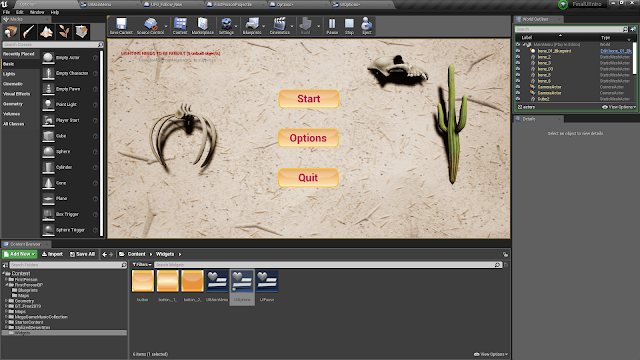
Level Buttons    I made these buttons to fit with the desert theme of this game. So I used different shades of orange for the button. There are 3 different types of buttons. The first one is for the regular button (unpressed and unhovered). This button is a gradient fade down. The second button is a gradient towards the center and is for one the button is hovered over. The third button is one main color and that is for when the button has been pushed. The three buttons can be viewed below, respectively.

Feedback Project

Image
Diagetic    When the button is pushed, it turns green and plays a sound. This is an example of a diagetic element because it is in the game world and is giving information back to the player. Meta    When the player is infected by a spider, an overlay of 'infectiousness' appears on the screen. The more infected you are, the harsher the overlay is. This is an example of meta because your character doesn't actually see this, but is part of the game world to show you, the player, that you are being infected. Non-Diagetic    Lost health is shown by the health circle in the bottom left of the UI. The more infected you are, the more the circle is blacked out. This is an example of Non-Diagetic because it isn't in the game world and the player can't see it. This is just for the player to know how much health they have left. Spatial    The arrow is pointing to where your character needs to go, it's not part of the ga...

Health Bars + Overlay

Image
Health Bar and Damage Overlay HUD    I created a game that is based on being infected. The more infected you become, the more debuffs you have. Some of these debuffs include slower move speed, less damage, reduced vision, and death. You can become infected by being bitten by different types of enemies. In this prototype the enemies are spiders, In the final project, they will also be able to spit projectiles at you. This prototype is probably going to become more advanced in my final Feedback project. 7 Stages of Action 1. Goal: The player's goal is to survive the facility and find the source of the infection. 2. Plan: The player will go through the facility and defeat enemies, the more enemies defeated the more the player comes to find how the infection is being spread and what caused it. 3. Specify:  The player will have a hard time not becoming infected, but there are antidotes spread across the world that can relieve some of the effects...

UI Elements

Image
UI Elements Spatial    There are two spatial aspects of this picture. The first is the blue diamond indicator telling the character where the quest requires them to be. The second is the animal paw in the bottom left letting the player know where their pet is. The Gamasutra article describes these aspects help to  "prevent them from having to break the experience by jumping to menu screens."(Stonehouse 2014). If this indicator wasn't here I would have to either look at the minimap or open the quest screen. Meta     The meta aspect of this screen is the inventory screen. In-game, your character has an echo device that creates a hologram that allows you to choose what weapons you have equipped and what skills you have. Your character knows what is going on, but doesn't see this exact screen. Diagetic     The diagetic aspect of this screen is the ammo count on the gun. It's part of the game world and part of the UI. T...

UI Intro Project

Image
UI Intro Project Flow Diagrams    My flow diagram is quite simple, you start on the main menu and you have 3 options. Quit, Start, or Options. Start will begin playing the game, quit will stop the game, and options will bring you to the options screen. From the options screen, you can go back to the start screen. Wireframes    The wireframes I made are the two UI Screens. Each screen has buttons and the options screen has a checkbox. Each of them also has a 3D background relating to the game. Prototype     Honestly, I spent way too much time on my prototype trying to get everything to work somewhat correctly, so I feel that the rest of my project is just OK. My Prototype includes a fully functioning main menu screen. The game is a very basic shooting level. The option's screen back button works, unfortunately, I could never get the sound to toggle on and off or continue playing from level to level. In retrospect, I should...
Image
Redesigning UI for Space Invaders Flow Diagram    In this flow diagram, I add some key functionality to Space Invaders that I believe the game needs. First, The achievements section is brand new and helps the player have some sort of accomplishments while playing the game. Next, are the new options that the user has to choose from. They can change the video, audio, and even difficulty settings. My favorite addition to the options menu is a theme selection. Theme Select Features    The Theme Select screen features a number of options that the user can change to enhance their gameplay experience. These new features will be unlocked as you play the game and unlock certain achievements. Each option will include a drop-down menu where the user can see what options they have unlocked, which they don't have unlocked, and even where to unlock them. On the right side of the screen, there will be a small sample image of what their game will look lik...

UI Post #1

Image
Kickstarter UI Flowchart When I was wondering what app to use for a UI flowchart, I wanted to go with something simple. I was so wrong when I chose the Kickstarter app. There are so many intricate UI details within the Kickstarter app. Its Menu screen had so many different options and so many different ways to access different areas of the app. After using a variety of apps, I think I appreciate Kickstarter's the most. Yes, it has a lot of options, but on a phone, it's very easy to scroll and look for the exact option you want. I'm not sure if this would work very well on a pc when you have a mouse, or even worse a touchpad. But this is why UI developers have to consider what kind of devices its users will be using when accessing their data. The Discoverability of a Mouse There are many types of mice on the market, the one I prefer the most is the Razer Deathadder.  This mouse has many different functions.  Let's start with the buttons that most...

Audio with Stains

Image
                          Characters    I personally always prefer non-humanoid characters simply because it is very hard to stereotype them, but not impossible. When I first saw this stain I immediately thought of some bug-like creature that had mandibles of some sort. What I created is this bug-like creature except it swims through the water. It can use its mandibles as a way to kill prey or to dig through objects such as sand. Audio    With my audio I wanted it to fit with the idea of the mandibles. I recorded one audio and found a music track as well. The audio I recorded fits with the sound that the mandibles would make underwater. The song would be used for an intense fight or maybe if it was running from something https://vocaroo.com/i/s18sMqCfgAso http://freemusicarchive.org/music/Nots/Live_on_WFMUs_Burn_It_Down_with_Nate_K_Nov_30_2014/Insect_eyes

Animations With Stains

Image
Original Stain I found this stain in my dorm common room and immediately saw it as a sentient rollerblade type creature with only one wheel. Sketch and Action Pose For my sketch, I simply drew an oval and added a wheel to it. Once I had done that I looked at the stain a bit more and realized there was a bit of a dip on the far right side of it. I figured that I could turn this into a turbo booster for him to travel faster. This idea led to my action pose of him zooming around. When it comes to animation, I believe this animation would have very little frames. You would simply need to change the facial expression and make the fire coming out of his booster change between two sprites. I feel that my character is easy to identify via silhouette because it has a very unique shape. 

Stereotypes

Image
  Stereotypes      Fetz has some stereotypical things about him. Hoodies can be related to shady individuals. There is a reason that gas stations require people who wear hoodies to keep the hoods down. Another stereotype could be that he is a snake, who is also a metaphorical snake. He lies and manipulates others to get what he wants.       Fetz also has some qualities that defy stereotypes. He isn't human, a lot of games main character are humans. The main character is a villain, many games' main character are heroes in their own stories. Fetz knows that he isn't meant to be a hero, he finds joy in the suffering of others.       "However, he also cautioned against defining characters by trauma or oppression" (Allen 2017) If I were to continue to make this game, I would try to avoid this stereotype. I would not want Fetz to feel that he is a villain because of trauma, I want him to be a villain because he wa...

Shape and Scale

Character      Snake boi (name TBD) will be a cartoony-sprite based character. It is hard to use the 'head' method on a non-humanoid character, but if I were to use it he would be able to fit about 11ish heads throughout his body. Because he has a snake figure, it is very simple to scale his shape and size.            The shape of this character will simply be a bendy line with arms between his head and the middle of his body. He will sometimes be wearing a hoodie-type piece of clothing over his head. I'm also considering adding something decorative to his tail, but I'm not sure yet. Environment      The shapes contained background will be mostly rectangle based to be used for buildings and windows for the buildings. The character will be able to fit through tight spaces, so the scale of the buildings and levels need to follow the scale of the character. Scaling the environment too big or too small could ...

Color

Image
Character Colors            I have chosen a mixture of black, dark green, and dark purple colors for my character. Steward describes the color green as "envy," purple as "luxury," and black as "mystery, evil, or grief." All of those descriptions match my character and the way he should portray himself to the player. He is not meant to be a 'good guy,' so using these types of colors should help him stray away from that.  Game Environment Colors       I have chosen these colors as the game environment should be portrayed as musty and dark. The brighter yellow was only included as it would be the only light source in the game. The other darker colors would be used for background, foreground, and many other objects within the game. This game is not meant to be happy or joyful, as you are playing as the villain.

High Concept

Image
High Concept      "This character is driven by envy and jealousy. It has colors of green and purple due to his caustic nature. It has a long shape and moves very quickly to be able to reach the items it desires the most. Its texture is slick and slippery to move through tight spaces." Research Topics Flora      For flora, I googled "Caustic Flowers/Flora." I got some very interesting results. I tried to use the many 'appendages' from the third image in a character below.      Animals      For animals, I google a mixture of "Envious Animals" and "Jealous Animals." Here I got exactly what you expect. The best way to find emotion in nature is through animals. I tried to use facial expressions from these images in many of my characters.       Clothing      I do like the texture/color of these clothes, however adding this texture to characters, especially on a ...